Placing People in Additional Roles
TeamOrgChart allows you to assign an existing person in the organization chart to one or more additional roles. This can be useful in various scenarios, such as:
arrow_circle_right
A person is seconded to an additional team
arrow_circle_right
They are acting as a joint leader
arrow_circle_right
Assistant to multiple teams
To assign a person to an additional role or roles:
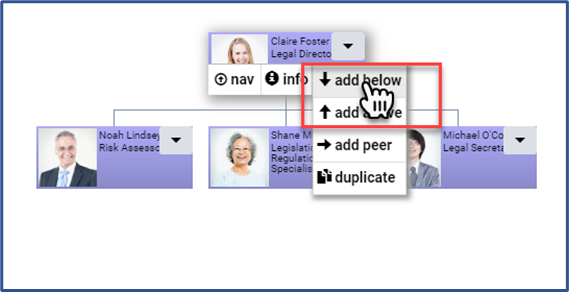
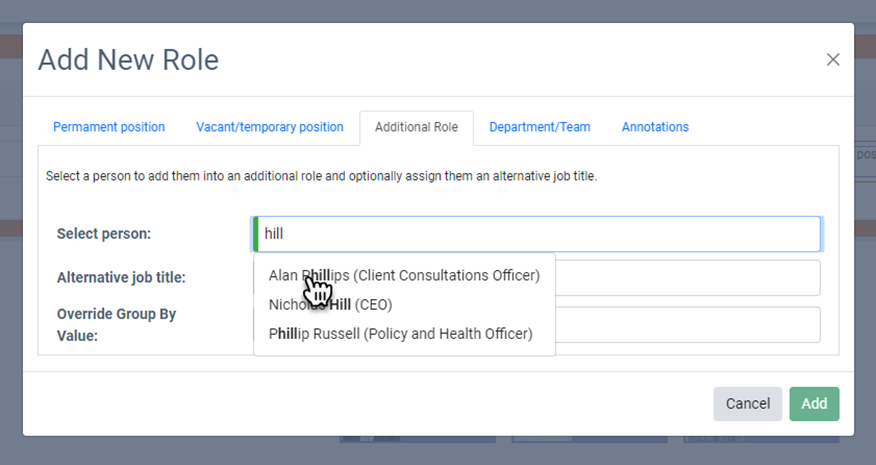
Use the "Add" menu from the manager, then switch to the "Additional Role" tab in the pop-up window.
Search for the person you wish to assign to the additional role, and if necessary, you can override their job title for this position.
Recommended Steps
arrow_circle_right
Identify people who should be in additional roles
arrow_circle_right
Create their roles in TeamOrgChart
Learn More
Add additional roles(c) TeamImprover.Com